


A warehouse fleet may generate alerts from vehicles, charging stations, traffic controls, sensors, and software interfaces. Without clear priorities and ownership, important alarms can be buried in routine notifications while minor events repeatedly interrupt operators.
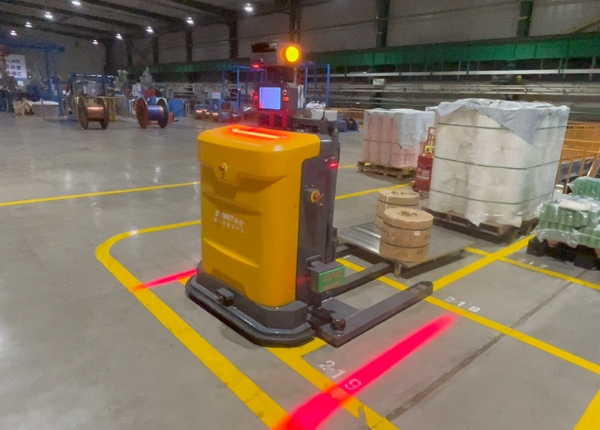
AGV forklift fleet management involves more than assigning transport tasks. Operations teams also need to know when a vehicle is unavailable, when a station cannot accept a pallet, when a safety device has been triggered, or when communication with the warehouse system has been interrupted.
These events do not all have the same operational impact. A low-priority notification about a vehicle approaching its charging threshold should not receive the same response as a safety-related stop or a failure that blocks a critical warehouse route.
An effective alert management design classifies events, defines response ownership, and specifies what should happen if an alert remains unresolved. This allows the warehouse team to respond consistently without requiring every notification to be handled by the same person.
Start by grouping alerts according to their operational meaning. The classification should be understandable to warehouse operators, maintenance staff, and system administrators.
Safety alerts: Events involving protective devices, unsafe access, or a vehicle stop caused by a safety condition.
Vehicle availability alerts: Battery conditions, vehicle faults, localization problems, or equipment states that prevent task execution.
Transport task alerts: Failed pickup, failed placement, blocked destination, or an incomplete transport task.
Traffic alerts: Route blockage, conflicting movement requests, or a vehicle waiting for access.
Station alerts: Transfer equipment unavailable, pallet detection failure, or station occupancy problems.
System alerts: Communication failures, interface errors, or abnormal control-system behavior.
Each alert should have a unique event code or identifiable category. Avoid relying only on free-text messages because similar events may be described differently by different software components.
A practical priority structure can distinguish between critical, high, medium, and informational events. The exact definitions should be agreed during project design.
Critical alerts require immediate attention because they may involve safety, a serious equipment condition, or a major interruption to warehouse operations. The response process should follow the approved site safety and incident procedures.
High-priority alerts affect important transport routes, critical stations, or a significant part of the fleet. They should be assigned promptly to the responsible technical or operations team.
Medium-priority alerts may affect an individual task or vehicle but have a manageable operational impact. The system should record them and route them to the appropriate owner.
Informational notifications provide status updates or early warnings that do not require immediate intervention. They should remain visible without creating unnecessary interruptions.
Priority should be based on the actual consequence of an event, not simply on which equipment generated it. A station fault affecting one low-volume area may be less urgent than a route blockage that prevents several vehicles from reaching a critical storage zone.
An alert is not actionable if no one knows who should respond. Define ownership for each event category before the system goes live.
For example, warehouse operators may handle permitted pallet-position checks or station readiness confirmations. Maintenance staff may investigate mechanical or electrical vehicle faults. Automation engineers may review navigation, dispatch, or fleet-control issues. IT teams may be responsible for network access and system connectivity, while the WMS administrator may investigate inventory or task-interface problems.
Ownership should be based on actual site responsibilities and authorization. A user who can acknowledge an alert should not automatically be assumed to have permission to reset a safety-related fault or release a vehicle back into operation.
Some alerts can be resolved by the first assigned team. Others need escalation when they remain unresolved or when their operational impact increases.
For each alert category, define:
Who receives the initial notification.
Who is responsible for acknowledging the event.
What information must be recorded during investigation.
When the alert should be escalated to another role.
Who can authorize recovery or return to service.
How the event is closed and documented.
Response time targets should reflect the site's operating hours, staffing model, and the seriousness of the event. A warehouse operating overnight needs an escalation path that remains available outside normal office hours.
Escalation should not mean repeatedly sending the same message to more people. It should transfer responsibility to a clearly identified role and preserve the history of previous actions.
When one underlying problem generates several related events, operators may receive a large number of notifications without understanding the original cause. For example, a blocked station may cause multiple vehicles to wait, producing repeated task or traffic alerts.
Configure the alert system to distinguish the original event from its downstream effects where the software supports this capability. Use event grouping, duplicate suppression, or related-event references to make the situation easier to understand.
Repeated notifications should still remain traceable. Suppressing duplicates must not remove the event history or hide an unresolved condition. The goal is to reduce noise while keeping important operational information available.
These three actions represent different stages of alert handling.
Acknowledgement means that a responsible person has seen the alert and accepted the task of investigating it. It does not prove that the underlying issue has been corrected.
Resolution means that the cause has been addressed or the required corrective action has been completed. The system should record the relevant action and outcome.
Recovery authorization confirms that the equipment or process can return to operation under the site's approved procedures. For safety-related conditions, recovery must follow the applicable safety controls and cannot be replaced by a simple software acknowledgement.
Keeping these stages separate prevents an alert from being closed merely because someone clicked a confirmation button.
Alert history helps warehouse managers identify recurring problems and understand where operational support is needed. Each event record should contain enough information to reconstruct what happened.
Useful fields include event ID, alert category, priority, vehicle or station ID, related task ID, event time, acknowledgement time, assigned owner, action history, resolution time, and final status.
Where relevant, retain associated system messages or diagnostic information. Access to these records should follow the organization's security and retention policies.
Review these items during system design and commissioning:
Alerts are grouped into understandable categories.
Priority definitions reflect operational and safety impact.
Every alert category has an assigned response owner.
Escalation rules cover all operating shifts.
Duplicate notifications do not hide the original event.
Acknowledgement and resolution are separate states.
Recovery permissions follow site procedures.
Event records include timestamps, task references, and actions.
Recurring alerts are reviewed for underlying causes.
Key checkpoint: Every important AGV alert needs three things: a defined priority, a named response owner, and a clear closure condition. Without these, a monitoring dashboard may display problems without helping the warehouse resolve them.
Commissioning should test more than whether alerts appear on a screen. Simulate representative operating conditions and confirm that the correct notification reaches the right role.
Test vehicle unavailability, blocked routes, occupied transfer points, failed pallet identification, communication interruptions, and other conditions relevant to the project. Verify that the alert receives the correct priority, can be acknowledged by an authorized user, and follows the intended escalation path.
Also test how the system behaves when an alert is resolved but the related transport task remains incomplete. The alert and task may require separate actions before normal operation can resume.
For a multi-vehicle warehouse, include scenarios in which one fault affects several vehicles. Confirm that the system helps operators identify the underlying issue rather than overwhelming them with disconnected notifications.





 Chinese
 English