


A fleet management system is a critical part of an automated warehouse. If the central dispatch server fails, the recovery process must restore more than the application itself. Warehouse maps, vehicle configuration, task data, traffic rules, charging settings and other system parameters may also need to be recovered.
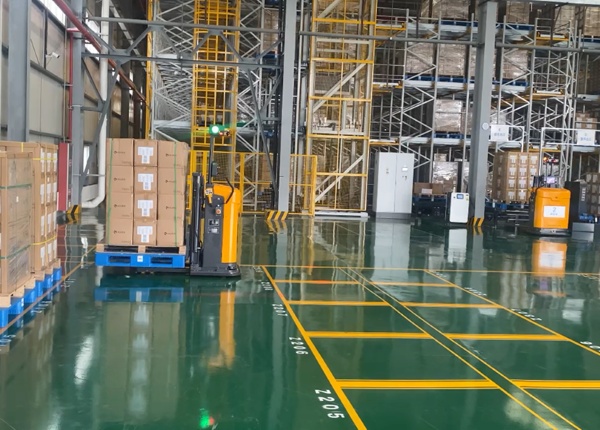
For an imported Chinese AGV fleet, buyers should establish a disaster recovery process before deployment. The objective is to minimize downtime while ensuring that the recovered system can safely reconnect and resynchronize the automated vehicles.
A practical AGV software disaster recovery lifecycle should include backup, failure detection, server restoration, application recovery, database recovery, map validation, AGV reconnection, operational testing and final acceptance. The most important requirement is to maintain a recoverable copy of the warehouse configuration independently from the production server.
A fleet software recovery process should be treated as a complete operational lifecycle rather than simply reinstalling an application. The warehouse IT team needs to know what data must be backed up, where it is stored, how it can be restored and how the AGVs reconnect after recovery.
01
Detect
Identify server, database or application failure.
02
Restore
Recover the operating environment and fleet application.
03
Recover Data
Restore maps, databases and configuration files.
04
Reconnect
Reconnect AGVs and validate communication.
05
Validate
Test navigation, task dispatch and safety functions.
Backing up the fleet application alone may not be sufficient. A warehouse automation system can contain many configuration elements that determine how vehicles operate inside the facility.
Warehouse maps — navigation maps and mapped operating areas.
Vehicle configuration — AGV IDs, vehicle parameters and operating profiles.
Traffic rules — zones, priorities, restricted areas and routing parameters.
Task configuration — pickup, drop-off and dispatch rules.
Charging configuration — charging stations, charging rules and battery parameters.
Database — operational records and system configuration data.
Software versions — installers, release versions and required dependencies.
Integration settings — WMS, ERP, API and PLC communication parameters where applicable.
A bare-metal restore means rebuilding the fleet control environment on a replacement or repaired server rather than simply reopening the existing application. The exact procedure depends on the operating system, database architecture and software supplied by the AGV manufacturer.
Before purchasing the system, request a documented recovery procedure from the supplier. Your IT department should know which operating system version, database engine, application packages, drivers and configuration files are required.
Do Not Wait Until the Server Fails
The most reliable approach is to perform a recovery test before the warehouse goes live. A backup that has never been restored should not be considered a proven disaster recovery solution.
1. Prepare Server
Install the required operating system and hardware drivers.
2. Install Fleet Software
Install the approved fleet control application and dependencies.
3. Restore Database
Restore the latest validated database backup.
4. Restore Maps
Recover the warehouse navigation maps and configuration.
5. Reconnect AGVs
Reconnect the vehicles and verify communication status.
6. Validate
Perform controlled navigation and task-dispatch tests.
They should be recoverable if the map files or database containing the map configuration are included in the backup. However, this should never be assumed.
Before deployment, ask the Chinese AGV supplier exactly where the warehouse map is stored and whether it can be exported independently from the main application. Ideally, the customer should be able to maintain a copy of the production map without depending entirely on the original server.
Can the complete warehouse map be exported?
Can the map be restored to a replacement server?
Are traffic zones and restricted areas included in the backup?
Are charging stations and task points preserved?
Can the map be versioned so the IT team can roll back to an earlier configuration?
Can the supplier provide a documented map recovery procedure?
After a central server failure, the AGVs may still contain some local state and sensor information, but the exact behavior depends on the vehicle architecture and fleet software design.
Odometry, localization and task state should therefore be treated separately. The vehicle may retain its local motion information while the fleet server needs to restore the warehouse map, task database and vehicle registration information.
Restore the central fleet application and database.
Confirm that the correct warehouse map is loaded.
Verify each AGV's identity and communication status.
Check localization and navigation status.
Confirm vehicle position before releasing automatic tasks.
Run controlled test movements.
Resume normal warehouse dispatch only after validation.
Remote technical support can be useful when the local IT team encounters a fleet software or database problem. However, remote access should be designed around the customer's cybersecurity requirements rather than leaving a permanent unrestricted connection to the production network.
A controlled remote-support architecture can use an approved VPN or secure remote-access gateway, temporary access credentials, access logging and explicit authorization from the customer's IT team.
Temporary Access
Enable remote access only when technical assistance is required.
Access Control
Limit support personnel to the systems required for troubleshooting.
Audit Logs
Record remote sessions and administrative actions.
Customer Approval
Let the local IT team control when external support can access the environment.
A disaster recovery plan becomes much more useful when the warehouse defines two practical targets: Recovery Time Objective (RTO) and Recovery Point Objective (RPO).
RTO describes how quickly the fleet system needs to return to operation. RPO describes how much data loss the operation can tolerate. For example, a warehouse may decide that the fleet control system must be restored within a specific number of hours and that only a limited amount of configuration or operational data can be lost.
How quickly can the fleet return to operation?
Use RTO to determine whether your organization needs a simple backup server, a standby server or a more advanced high-availability architecture.
How much recoverable data can the warehouse afford to lose?
Use RPO to determine backup frequency and how much historical configuration data should be retained.
Keeping every backup on the same fleet server defeats much of the purpose of disaster recovery. If the server's storage fails, the backup may be lost at the same time.
Production
Live fleet server and database.
Local Backup
Fast recovery copy stored separately from the production server.
Offline Copy
Protected backup available if the production network is compromised.
Off-Site Copy
Additional protection against physical site damage.
Backup testing should be part of normal fleet maintenance rather than a one-time commissioning activity. A recovery test should verify that the backup can actually rebuild the software environment and restore the warehouse configuration.
A practical test should include restoring the application on a test or replacement environment, loading the backup database and map, checking vehicle communication and performing controlled operational tests before the recovered system is considered production-ready.
| Test Item | Expected Result |
|---|---|
| Fleet Application | Application starts correctly on the recovered environment. |
| Database | Required configuration and operational data are restored. |
| Warehouse Map | Correct map and configured zones are available. |
| AGV Communication | Vehicles reconnect to the recovered fleet system. |
| Localization | Vehicle localization and navigation status are valid. |
| Task Dispatch | Pickup and delivery tasks can be dispatched correctly. |
| Safety | Safety functions remain operational after recovery. |
Can the complete fleet software environment be restored on replacement server hardware?
Where are warehouse maps stored?
Can customers independently export and back up their maps?
What database technology does the fleet system use?
What files and configuration data must be included in the backup?
Can the supplier provide a complete disaster recovery procedure in English?
How are AGVs resynchronized after a central server failure?
Can remote support be provided through a customer-controlled VPN?
Can the customer disable remote access when support is not required?
What is the expected recovery time for a complete fleet software failure?
Can the supplier participate in an on-site disaster recovery test before final acceptance?
An AGV disaster recovery plan should cover the entire fleet software environment, not just the application installer. Before importing an automated forklift system from China, confirm how the warehouse maps, databases, vehicle configurations and integration settings are backed up and restored. A documented recovery procedure and successful recovery test can significantly reduce operational risk if the central fleet server fails.
FREE ENGINEERING SUPPORT Stop Gambling on Generic Platforms. Get an AGV/AMR Tailored to Your Warehouse.Buying automated guided vehicles involves complex safety standards (CE/ANSI), navigation setups (Laser SLAM), and ERP system integration. Don't risk your factory safety with middle-men. ✓ 100% Direct Factory: Customized payload up to 5 Tons. ✓ Free CAD Simulation: Send us your layout, and our engineers will simulate the optimal AGV routes. ✓ Global Support: Overseas installation guidance & local maintenance partners. |





 Chinese
 English