


In a busy warehouse, AGV productivity can be limited by traffic management rather than vehicle speed. When several autonomous forklifts approach the same intersection, poorly configured priorities can create unnecessary waiting, queueing and deadlocks.
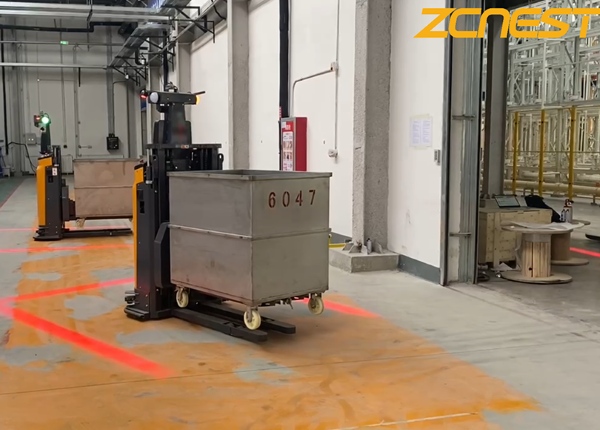
For a Chinese AGV fleet deployed in a U.S. warehouse, the central fleet management system should be configured around the actual warehouse layout, pallet flow, pedestrian areas and peak-hour traffic patterns. The goal is to give high-volume routes sufficient priority while maintaining safe separation from people and manually operated equipment.
A properly configured AGV fleet-management system can typically use map-based traffic rules, route priorities, restricted zones, speed limits and task-dispatch logic to manage warehouse intersections. The exact functions depend on the Chinese manufacturer's software architecture and the AGV model, so these capabilities should be confirmed during the RFQ and site-acceptance process.
An intersection can become a capacity constraint when multiple AGVs repeatedly compete for the same physical space. This is especially common near receiving areas, high-volume storage aisles, staging areas, elevators and shipping docks.
For example, if five AGVs use the same crossway during a peak period, giving every vehicle identical priority may cause repeated stop-and-go behavior. A better traffic strategy considers the direction, destination, task urgency and expected traffic volume.
High-Volume Routes
Give frequently used pallet routes appropriate priority to reduce unnecessary waiting.
Cross Traffic
Control competing traffic streams before they create queues at the intersection.
Pedestrian Areas
Use designated low-speed or restricted areas around doors and walkways.
Manual Vehicles
Allow the system to respond when manually operated forklifts temporarily block AGV routes.
If the fleet-management platform supports directional traffic rules, a warehouse engineer can define specific map segments as one-way routes. This can be useful where two-way AGV traffic repeatedly creates conflicts.
A one-way traffic design can be particularly effective around narrow intersections, rack-end turns and high-volume pallet-transfer corridors. Instead of allowing vehicles to approach from every direction, the software can guide traffic around a predictable circulation loop.
Receiving → Main Crossway → Storage
Storage → Shipping Staging
Shipping → Return Loop → Charging Area
Separate pedestrian crossing points from high-volume AGV lanes
Before deployment, the supplier should confirm whether the software supports one-way segments, directional restrictions, route priorities and zone-based traffic rules.
A fleet-management system normally needs to coordinate more than the shortest route. When multiple vehicles compete for the same intersection, the dispatch system may need to determine which vehicle enters first, which vehicle waits and whether another vehicle should be rerouted.
For a high-volume warehouse, useful traffic-management functions may include intersection reservation, route prioritization, conflict avoidance, waiting-position assignment and alternative-path planning.
Do Not Optimize Only for the Shortest Route
The shortest route for one AGV may create a longer queue for the entire fleet. Traffic optimization should therefore be measured using fleet-level KPIs such as pallets per hour, average waiting time, intersection occupancy and vehicle utilization.
Start by identifying which traffic flows generate the highest number of pallet movements. These routes can then receive higher dispatch priority during peak operating periods.
| Traffic Type | Possible Rule |
|---|---|
| High-volume pallet route | Higher traffic priority during peak periods |
| Low-priority replenishment | Allow vehicles to wait when the main route is occupied |
| Pedestrian crossing | Low-speed or controlled crossing zone |
| Emergency access | Keep route available and prevent normal task parking |
| Charging traffic | Avoid charging vehicles blocking high-volume intersections |
Yes, if the AGV navigation and fleet software support map-based speed zones. Office entrances, pedestrian walkways, break-room doors and frequently crossed aisles should be treated differently from isolated storage aisles.
A warehouse can define a corridor around an office door and assign a reduced travel speed. The exact speed limit should be determined from the vehicle's safety design, risk assessment and applicable site requirements rather than selecting an arbitrary software value.
Normal Zone: standard autonomous operating area.
Slow-Speed Zone: pedestrian or high-interaction area.
Restricted Zone: AGV entry prohibited unless specifically authorized.
Temporary Blocked Zone: temporarily unavailable because of maintenance, construction or manual operations.
A properly configured autonomous forklift should detect an obstacle within its designed detection and safety zones and respond according to its safety logic. Depending on the system design, the AGV may stop, wait for the obstacle to clear or request a new route from the fleet-management system.
The important distinction is between obstacle detection and traffic rerouting. The onboard safety system handles immediate collision-risk response, while the central fleet software may determine whether the vehicle can safely continue using another route.
An AGV approaches its assigned warehouse lane.
A manually operated forklift leaves a pallet in the planned path.
The AGV detects the obstruction and reduces speed or stops according to its safety configuration.
The fleet system determines whether an alternative route is available.
If no safe route exists, the AGV remains stopped until the obstruction is removed or the task is otherwise handled.
Do not judge traffic optimization only by watching the AGVs move. Collect operational data before and after changing the traffic rules.
Pallets / Hour
Measure whether the intersection changes increase actual warehouse throughput.
Average Waiting Time
Track how long AGVs wait before entering or leaving congested areas.
Vehicle Utilization
Compare productive travel time against idle and waiting time.
Blocked Events
Identify how often manual vehicles, pallets or other obstacles interrupt AGV routes.
Intersection Occupancy
Determine whether the crossway is becoming a persistent capacity constraint.
Deadlock Events
Monitor situations where vehicles cannot proceed without intervention.
Traffic-management capabilities should be included in the technical specification rather than treated as an informal software feature. During the RFQ and factory acceptance process, ask the supplier to demonstrate the actual functions on the proposed fleet-management platform.
Can the software configure one-way traffic segments?
Can different routes or tasks receive different priorities?
Can the system reserve intersections for individual AGVs?
Can speed limits be assigned to specific map zones?
Can temporary restricted zones be created without rebuilding the complete map?
Can blocked routes trigger automatic rerouting?
Can operators manually release, pause or reassign tasks?
Can traffic events and waiting time be recorded for later analysis?
Can the supplier demonstrate these functions using the actual software version proposed for the project?
When AGV traffic becomes congested, adding more vehicles is not always the best solution. Reviewing intersection priorities, one-way routes, pedestrian zones, temporary obstacles and task-dispatch rules can often reveal the real capacity constraint.
For a Chinese AGV deployment, the traffic rules should be tested against the actual warehouse layout and peak pallet flow before final acceptance. The objective is not simply to make individual AGVs move faster, but to increase total fleet throughput while maintaining safe and predictable traffic behavior.
FREE ENGINEERING SUPPORT Stop Gambling on Generic Platforms. Get an AGV/AMR Tailored to Your Warehouse.Buying automated guided vehicles involves complex safety standards (CE/ANSI), navigation setups (Laser SLAM), and ERP system integration. Don't risk your factory safety with middle-men. ✓ 100% Direct Factory: Customized payload up to 5 Tons. ✓ Free CAD Simulation: Send us your layout, and our engineers will simulate the optimal AGV routes. ✓ Global Support: Overseas installation guidance & local maintenance partners. |





 Chinese
 English