


Outbound Logistics Automation Guide
Automated pallet transport must support dispatch deadlines, staging capacity, and loading sequence requirements. ZCNEST explains how to connect picking completion, outbound staging, AGV missions, and shipment release into a controlled warehouse workflow.
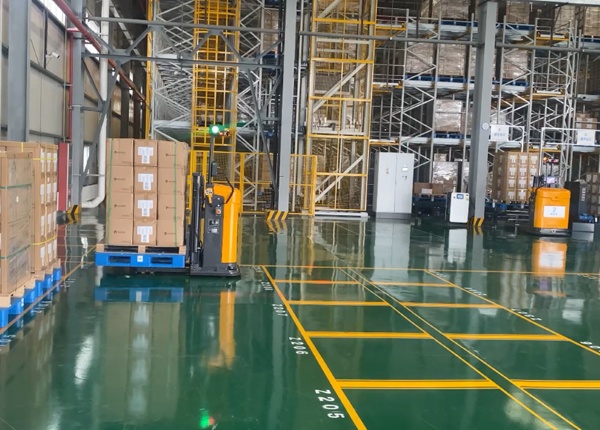
A pallet that has been picked is not necessarily ready to load onto a truck. It may still require consolidation, wrapping, labeling, document checks, shipment verification, or staging by route and departure time. The AGV workflow should distinguish a completed warehouse pick from a pallet that is approved for dispatch movement.
If vehicles collect pallets before the downstream process is ready, they may deliver loads to occupied staging positions or block access for other shipments. If missions are released too late, the warehouse may miss its loading window even when the fleet has available capacity.
Picking complete: the pallet has been prepared for the shipment.
Verification complete: required identification and checks have passed.
Dispatch-ready: the pallet can move to its assigned staging position.
Staged: the pallet has arrived at the designated dispatch location.
Loaded or released: the final shipping event has been confirmed by the responsible process.
STAGE 01
Only pallets that meet the agreed dispatch criteria should be assigned to an outbound transport mission.
STAGE 02
Match the destination to the shipment, loading area, or dispatch sequence. Confirm that the position is available before dispatching the vehicle.
STAGE 03
Record the pallet's arrival and preserve the distinction between staging completion and physical truck loading.
Outbound staging may be organized by carrier, route, customer, loading door, shipment, or departure window. The right method depends on how the warehouse prepares and loads orders. A staging plan that ignores these rules can create unnecessary pallet reshuffling and increase the risk of loading the wrong shipment.
Mark the positions that AGVs can use and define which system allocates them. If several vehicles serve the same loading area, establish a method for preventing multiple missions from targeting an occupied position. The layout must also leave room for manual inspections, pallet wrapping, and safe access to loading equipment.
Outbound volumes often concentrate around carrier pickup times. Calculate the number of pallets that may need staging during the busiest interval, not just the daily average. Include the time required for the loading team to remove pallets from the staging area so that available capacity is not overestimated.
When multiple shipments compete for the same fleet, task priority should reflect the actual dispatch plan. A pallet for an imminent departure may need to move before a routine replenishment task. However, an overly aggressive priority scheme can delay other work and create congestion near loading doors.
Define the priority rules with warehouse operations and shipping teams. Consider the departure time, required pallet sequence, destination availability, and current traffic. Test how the fleet behaves when a high-priority task is released while other missions are already in progress.
The WMS may own shipment and inventory records, while the fleet-control system tracks vehicle missions. The interface should make it clear when a pallet is assigned, collected, delivered, delayed, or redirected. A completed AGV mission must not automatically be interpreted as proof that the pallet has been loaded onto a truck.
Test canceled shipments, changes to loading doors, occupied staging positions, unreadable pallet IDs, and delayed vehicles. The recovery process should prevent a canceled or reassigned pallet from remaining in an outdated task queue.
Track the time from dispatch readiness to staging arrival, the number of pallets ready before each loading window, staging occupancy, delayed missions, and manual reshuffling. Compare results across normal and peak periods to determine whether the bottleneck is in picking, AGV transport, staging, or loading.





 Chinese
 English