


WAREHOUSE PERFORMANCE MANAGEMENT
An AGV forklift dashboard should explain how warehouse work is progressing, where delays originate and which operating conditions require attention. Consistent metric definitions are more useful than a large collection of numbers that different departments interpret differently.
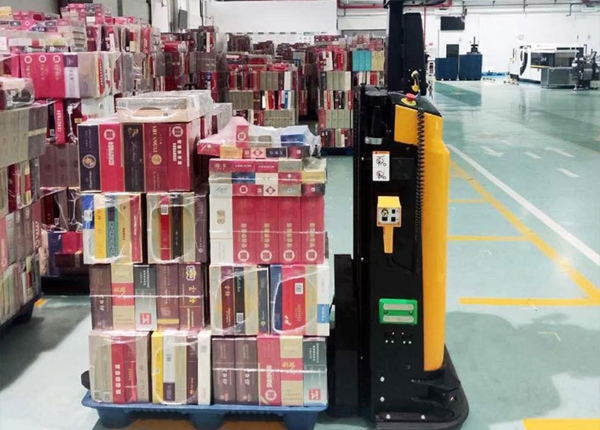
After an AGV forklift fleet enters operation, warehouse managers need to understand more than the number of vehicles online. They need to know whether tasks are completed on time, whether waiting is concentrated at particular locations and whether recurring exceptions are reducing available capacity.
A useful KPI dashboard connects system activity to the warehouse's operating objectives. It also uses consistent definitions, so that daily reports can be compared across shifts, task categories and warehouse zones.
The first step is not choosing a dashboard tool. It is deciding which questions the operating team needs to answer and what data can reliably answer them.
Define the decisions that warehouse managers make regularly. These questions should determine which metrics appear on the dashboard.
Are transport tasks being completed within the required time?
Where do tasks spend the most time waiting?
Which task categories are falling behind?
How often do tasks require manual intervention?
Are specific stations or warehouse zones creating recurring delays?
Is vehicle downtime affecting the planned workload?
A dashboard designed around these questions is easier to use than one that displays every available system variable. Additional metrics can be introduced when they support a defined decision or investigation.
Task throughput measures the number of completed transport tasks within a defined period. It can help managers understand whether the system is handling the expected workload, but it must be interpreted alongside task type and operating conditions.
One pallet movement may be short and straightforward, while another requires a longer route, a high-level storage operation or a complex transfer interface. Counting both as one task does not mean they require the same amount of time or effort.
For useful comparisons, report throughput by task category or operating zone where possible. Record the reporting window and distinguish completed tasks from tasks that were merely created, assigned or canceled.
Do not use throughput alone to judge performance. A system may complete many simple tasks while delaying a smaller number of business-critical movements.
Task cycle time measures the elapsed time between defined task events. The exact start and end points must be documented before the metric is used for comparison.
For example, a warehouse may measure from task release to confirmed completion. That interval includes any queueing before execution. A separate execution-time measure can show how long the task took after the vehicle began working.
Keeping these measures separate helps distinguish dispatch delays from physical movement delays. If cycle time increases while execution time remains stable, the cause may be queue buildup, destination availability or an upstream process delay.
Consider reporting median and upper-percentile times rather than only an average. A small number of long-running tasks can be important to warehouse operations even when the average appears acceptable.
On-time completion is meaningful only when the task deadline has a clear operational basis. The deadline may relate to outbound staging, replenishment availability or another documented process requirement.
Define how on-time performance is calculated, including which tasks are included, how canceled tasks are handled and whether approved changes to a deadline affect the result.
Break the metric down by task category or business process. A single overall percentage may conceal a problem in a time-sensitive area of the warehouse.
Review late tasks alongside their reasons. A missed deadline caused by an unavailable destination requires a different response from one caused by poor dispatch prioritization or equipment downtime.
Exceptions often explain why a fleet does not achieve its planned output. Track the number of tasks that require intervention and classify them by cause rather than treating all failures as equivalent.
Useful categories may include missing loads, unavailable destinations, identification failures, transfer-station problems, communication issues and vehicle faults. Use the categories supported by the actual system and maintain consistent definitions.
Measure how long each issue remains unresolved and whether the same location or process produces repeated incidents. A high exception count may indicate a process problem rather than a vehicle problem.
Also distinguish between an alert that requires no action and an event that prevents work from continuing. This keeps the dashboard focused on operationally meaningful conditions.
Vehicle availability can help the team understand how much of the planned operating period is affected by equipment being unavailable. However, the calculation must distinguish scheduled non-operating time from unplanned downtime.
Define whether planned maintenance, charging, waiting for work and blocked access are included or excluded. These conditions may have different causes and require different management responses.
Where the system supports it, report availability by vehicle and by cause. This can help identify whether downtime is concentrated in one unit, a shared charging process or a recurring operating condition.
Do not interpret a high availability percentage as proof of strong warehouse performance. Vehicles can be available but underused because of task release delays, station bottlenecks or insufficient work readiness.
Organize the dashboard so that managers can move from an overall result to the underlying tasks or events. A headline KPI should link to the detail needed to investigate an unusual result.
For example, a rising task cycle time should allow the user to review the affected task categories, zones, queue times and exceptions. A drop in on-time performance should reveal which deadlines were missed and why.
Agree on reporting intervals and data owners. The warehouse operations team should understand the business meaning of the metrics, while the system or IT team should confirm that the underlying timestamps and status events are reliable.
Review the dashboard regularly and remove metrics that do not support a decision. A smaller set of trusted measures is preferable to a large dashboard with inconsistent or ambiguous definitions.
Task throughput is measured using completed tasks and defined reporting periods.
Task cycle time and execution time are clearly distinguished.
On-time completion is linked to documented operational deadlines.
Exceptions are classified by cause and resolution time.
Vehicle availability has a consistent calculation method.
Metrics can be filtered by task category, shift or warehouse zone.
Each KPI has an owner and a defined operational response.
Key checkpoint: Every KPI should have a precise definition, a reliable data source and a clear reason for being monitored. If a metric changes, the team should be able to investigate the cause and decide what to do next.
When comparing AGV forklift solutions, ask which task events, status records and exception details are available for reporting. Clarify whether the information can be exported, accessed through an interface or viewed only within the supplier's software.
Provide examples of the operational questions your warehouse needs to answer. Request a demonstration using representative task records and confirm how the dashboard handles incomplete tasks, canceled requests and periods when vehicles are not scheduled to operate.
📖 AGV Forklift Guide — Essential manual for selection and safety.
⚙️ How AGV Systems Work — A deep dive into navigation and logic.
⚖️ AGV vs. AMR Comparison — Choosing the right technology for your facility.
💰 AGV Cost and ROI — Evaluating investment and payback periods.





 Chinese
 English