


Warehouse Identification Guide
Barcode scanning can help verify pallet identity, destination, and movement status. ZCNEST explains where scanning should occur, how scan results connect to warehouse software, and how to prevent unreadable labels from disrupting automated forklift operations.
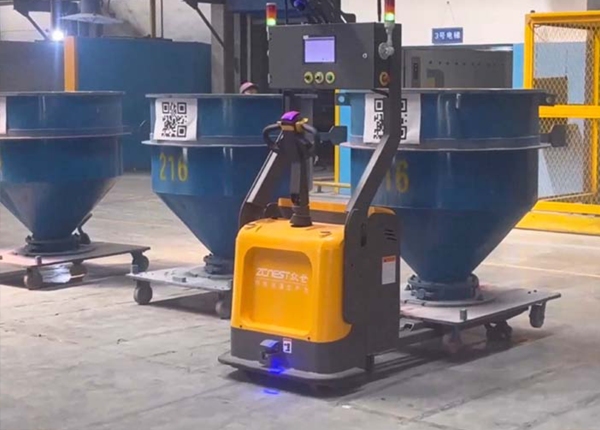
A barcode integration should begin with a business requirement, not a scanner specification. The warehouse may need to identify a pallet at receiving, confirm the load before transport, validate a destination, or reconcile a physical movement with inventory records. Each requirement determines where scanning belongs in the workflow.
A barcode can identify a pallet, shipment, product, or location, depending on the labeling standard. It does not automatically prove that the pallet contains the correct goods or that its physical condition is acceptable. The system must compare the decoded value with the expected task and the relevant warehouse records.
Receiving: associate the incoming pallet with an order or inventory record.
Pickup: verify that the vehicle has collected the intended load.
Delivery: confirm that the pallet reached the assigned handoff or storage point.
Exception: record unreadable, missing, duplicated, or unexpected barcode values.
CORE 01
A fixed scanner or vehicle-mounted reader captures the label at a defined point. Placement, reading distance, label orientation, and pallet geometry determine whether the scan is reliable.
CORE 02
The decoded value is checked against the expected pallet, mission, location, or inventory record. An invalid value should trigger a defined exception rather than silently passing through.
CORE 03
The responsible software records the scan result and determines whether the AGV can continue, must retry, or should wait for operator intervention.
A fixed scanner is useful when pallets pass through a repeatable transfer point, such as a receiving station or conveyor interface. It can offer controlled geometry and a predictable scan position. Its limitation is that pallets must pass through the scanning zone in the intended orientation.
A vehicle-mounted scanner can identify labels during pickup or delivery, reducing the need for a separate scanning station in some workflows. However, the label may be blocked by the load, damaged, facing away from the reader, or located outside the reader's field of view. The scanner position must be tested with actual pallets and loads.
Some sites may need both approaches: fixed scanning for inbound identification and vehicle-mounted scanning for a particular transfer confirmation. The correct design depends on the required event, not on choosing the largest number of scanners.
Barcode failures are often caused by physical conditions: torn labels, glare, dirt, poor contrast, inconsistent placement, curved surfaces, or shrink wrap covering the code. A successful laboratory scan does not prove that every pallet in daily warehouse operation will be readable.
Allow a limited number of scan retries where it is safe to do so.
Route repeated failures to a designated inspection or relabeling point.
Keep the pallet identity and mission status visible to authorized operators.
Prevent a failed scan from being recorded as a successful inventory transfer.
Define how a corrected label is linked to the original inventory record.
Do not let an AGV repeatedly attempt a scan indefinitely. The recovery process should identify the failure, preserve the current task state, and allow an authorized person or system to decide the next action.
The WMS, fleet-management software, scanner, and vehicle may each hold different parts of a transaction. Integration testing should establish which system is authoritative for pallet identity, task status, and inventory location. Otherwise, a scan may succeed while the inventory record remains unchanged—or a retry may create a duplicate movement.
Test the full process with correct labels, wrong labels, duplicate codes, lost messages, delayed responses, and software restarts. Verify that the systems agree on whether the pallet was picked up, delivered, rejected, or sent for manual handling.
Confirm barcode type, label dimensions, placement, reading distance, lighting conditions, communication interface, and the software that validates scan results. Provide representative pallets and labels for a proof-of-concept test. Scanner compatibility should be confirmed as part of the complete vehicle and system design.
Warehouse preparation has a direct impact on AGV forklift selection, integration, commissioning, and acceptance. Before equipment is manufactured or delivered, buyers should confirm the physical layout, pallet specifications, operating workflow, information-system requirements, and site responsibilities. This guide provides a practical checklist for preparing a warehouse automation project.
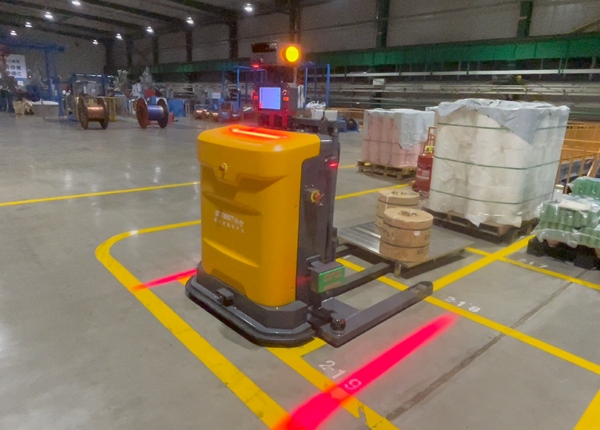
A warehouse drawing is one of the most important inputs for AGV forklift planning, but it must reflect actual operating conditions. Changes made after the drawing was created, temporary storage areas, rack projections, and equipment installed along travel routes can all affect vehicle movement. Prepare the latest available layout and identify the areas included in the automation scope. Mark receiving points, storage locations, outbound staging, charging areas, transfer stations, restricted zones, and the routes between them. Provide CAD or other suitable layout files with dimensions and a clear coordinate reference. Confirm rack positions, aisle widths, rack heights, columns, doors, and fixed obstructions. Mark pickup and drop-off locations and specify the expected pallet orientation. Identify pedestrian routes, manual forklift traffic, emergency exits, and restricted areas. Record floor joints, gradients, surface changes, and areas requiring further inspection. Where the drawings may be outdated, verify critical dimensions on site. Vehicle selection and route design should be based on the usable space, not only the nominal dimensions shown in a drawing. AREA 01 Verify aisle clearance, floor condition, ramps, doorways, rack geometry, charging locations, and the operating space at each handover point. AREA 02 Document pallet dimensions, weight range, load center, fork entry direction, overhang, and any variation that may affect pickup or placement. AREA 03 Map the movement from origin to destination, identify peak periods, and define how tasks are released, prioritized, completed, and recovered after failure. AREA 04 Confirm the required WMS or WCS interfaces, network access, IT approvals, commissioning access, and responsibilities for testing and acceptance. AGV forklift selection depends on the loads the vehicle must handle, not simply the average pallet in the warehouse. A small number of heavier, taller, or unusually shaped loads can determine the required vehicle configuration. Minimum, typical, and maximum pallet dimensions. Minimum, typical, and maximum loaded pallet weight. Load height, center of gravity considerations, and overhang. Pallet material, bottom-board design, and fork entry requirements. Required pickup and placement heights and the destination rack configuration. Photographs of representative pallets and difficult loads can help the supplier understand the handling conditions. If pallet quality varies significantly, identify that variation early rather than treating every pallet as identical. Before installation, describe how a transport task begins, who assigns the destination, and how the warehouse knows that the movement has been completed. The process may involve a WMS, fleet control system, conveyor, operator, or another handling device. Create a simple workflow for normal operations and a separate process for exceptions. Examples include an occupied destination, a missing pallet, an unavailable pickup point, a blocked route, or a communication interruption. Which system creates and prioritizes each transport task? How are pallet IDs and destination locations exchanged? How is task completion confirmed and recorded? Who responds when an AGV cannot complete a task? How are manual interventions reconciled with warehouse inventory records? The project team should confirm the network and IT arrangements required by the proposed system. This may include wireless coverage, network access, firewall rules, device permissions, logging, and approved remote support methods. Test the actual operating routes and transfer areas rather than relying only on coverage estimates. Review safety arrangements for pedestrian crossings, manual vehicles, staging zones, and emergency access. Establish the site process for isolating equipment, responding to alarms, and recovering failed tasks. Final arrangements should reflect the vehicle's design, site risk assessment, and applicable requirements. Also confirm practical commissioning arrangements, including delivery access, unloading equipment, installation space, power availability, test pallets, representative loads, and access to the customer's IT and warehouse personnel. Acceptance criteria should be agreed before commissioning starts. They should describe measurable results under defined conditions rather than relying on broad statements such as smooth operation or high efficiency. Successful pickup and placement using representative pallets. Required travel and handling performance under the agreed workload. Correct task status exchange with connected warehouse systems. Defined responses to selected faults and blocked locations. Verification of safety functions and operating procedures. Completion of training, documentation, and outstanding issue records. Specify the test conditions, measurement method, and responsibility for resolving failed items. This gives both the customer and supplier a clear basis for determining whether the system is ready for routine operation. Before finalizing the installation schedule, confirm that the latest layout is available, critical dimensions have been verified, pallet data has been collected, workflows are documented, software responsibilities are assigned, network access is approved, safety arrangements are defined, and acceptance criteria are agreed. Any unresolved item should have a named owner and a target completion date.01. Prepare an Accurate Warehouse Layout
Four Preparation Areas Before Installation
Physical Site Conditions
Pallets and Load Specifications
Operating Workflow and Throughput
Software, Network, and Site Access
02. Document the Actual Pallet Handling Requirements
Information to Collect
03. Map the Workflow and Define System Ownership
Questions to Resolve Before Commissioning
04. Check Network, Safety, and Installation Readiness
05. Agree on Acceptance Criteria Before Delivery
Warehouse Readiness Checklist
📖 AGV Forklift Guide — Essential manual for selection and safety.
⚙️ How AGV Systems Work — A deep dive into navigation and logic.
⚖️ AGV vs. AMR Comparison — Choosing the right technology for your facility.
💰 AGV Cost and ROI — Evaluating investment and payback periods.





 Chinese
 English