


WAREHOUSE DATA MANAGEMENT
Reliable automated putaway and retrieval depend on consistent location records. Learn how to structure storage addresses, control location status, and prevent mismatches between warehouse data and physical rack positions.
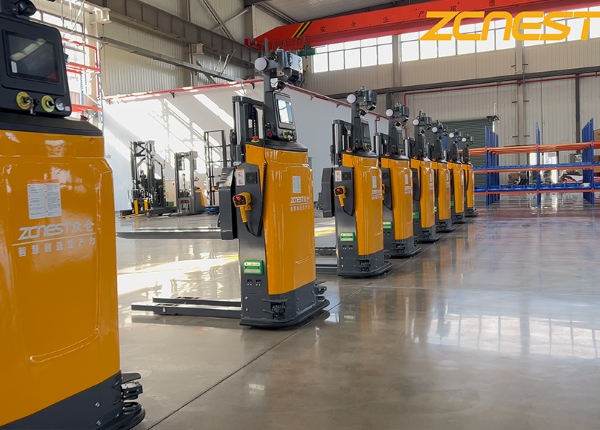
An AGV forklift may receive a valid transport task and follow its route correctly, yet still deliver a pallet to the wrong storage position if the location data is inaccurate. Duplicate addresses, outdated rack layouts, and inconsistent naming conventions can undermine automated warehouse operations even when the physical equipment is working properly.
Location master data connects the warehouse's physical storage structure with the information used to create and execute tasks. Before automating putaway, retrieval, or replenishment, warehouse operators should establish how locations are named, validated, released, and maintained.
Each storage position should have a unique identifier that can be understood by warehouse staff and processed consistently by connected systems. The exact format depends on the warehouse design, but it should distinguish relevant storage levels and positions without ambiguity.
For example, a location code may contain a zone, aisle, rack section, bay, and level. Use this only as a structural example; the actual code should match the physical layout and the capabilities of the WMS and fleet control software.
Document the naming rules before creating large numbers of location records. Avoid using the same identifier for different physical positions or changing code meanings without a controlled update process.
Every location record should correspond to a real, accessible storage position. The warehouse layout, rack numbering, location labels, and system records must agree with one another.
Verify the aisle, rack section, bay, and level assigned to each location.
Check that the physical label matches the location ID in the WMS.
Identify positions that cannot be reached by the selected vehicle configuration.
Record restrictions related to load dimensions, weight, or storage rules.
Remove or deactivate records for locations that no longer exist.
When rack layouts change, update the approved location map and system records together. A physical relocation without a corresponding data update can create a mismatch that is difficult to detect during routine operations.
A storage location is not always available simply because it appears in the master data. It may be occupied, reserved for an incoming pallet, temporarily blocked, under maintenance, or restricted to a particular load type.
Define the location statuses used by the warehouse and specify which system or role can change each status. Make sure task assignment considers the current status rather than relying only on the location's permanent attributes.
For example, a location temporarily blocked for rack inspection should not remain eligible for automated putaway. Likewise, a reserved destination should not be assigned to multiple incompatible tasks at the same time.
Location data answers where a pallet may be stored. Pallet or handling-unit data identifies what is being moved. The warehouse system needs a reliable relationship between these records to maintain inventory accuracy.
Define how the system handles a pallet arriving without a valid ID, a destination that rejects the load, or a physical location that does not match the recorded inventory. Establish whether the task should be paused, redirected, or sent for manual review under each condition.
Do not allow uncertain transfers to silently overwrite inventory records. The system should preserve enough information to identify the task, expected destination, actual outcome, and person or process responsible for resolving the discrepancy.
Location master data often changes when racks are added, aisles are reconfigured, storage policies change, or temporary areas become permanent. Without clear ownership, updates can be delayed or applied inconsistently across systems.
Assign responsibility for creating, approving, modifying, and deactivating location records. Define how changes are communicated to warehouse operations and the automation team, and whether changes require a route review or regression test.
Maintain a record of significant revisions. This makes it easier to investigate when a task starts failing after a warehouse layout or location configuration change.
Before releasing automated tasks, compare the location master against the current warehouse layout and verify a representative set of physical positions. Include difficult-to-access positions, restricted storage areas, and locations close to intersections or handover points.
Test the complete transaction from task creation to destination confirmation. Check that the selected destination is valid, the task is routed correctly, and the final status is recorded consistently by the relevant systems.
IDENTITY — Every physical storage position has a unique code.
ACCURACY — Rack labels and system records match the actual layout.
STATUS — Occupied, reserved, blocked, and available locations are distinguished.
OWNERSHIP — Data changes have an assigned owner and approval process.
VALIDATION — Test tasks confirm that digital destinations match physical positions.
Automated storage tasks depend on accurate, current, and uniquely identified locations. Treat location master data as an operational control that must be maintained whenever the physical warehouse changes.
ZCNest can discuss storage workflows, task interfaces, and location-data requirements for AGV forklift projects. Share your current warehouse system and storage structure to identify the information needed for technical evaluation.
📖 AGV Forklift Guide — Essential manual for selection and safety.
⚙️ How AGV Systems Work — A deep dive into navigation and logic.
⚖️ AGV vs. AMR Comparison — Choosing the right technology for your facility.
💰 AGV Cost and ROI — Evaluating investment and payback periods.





 Chinese
 English