


WAREHOUSE SOFTWARE INTERFACES
A successful WMS connection requires more than sending a destination to an AGV forklift. The systems must agree on task ownership, acknowledgments, status changes, inventory confirmation and recovery when messages are delayed or operations do not finish as expected.
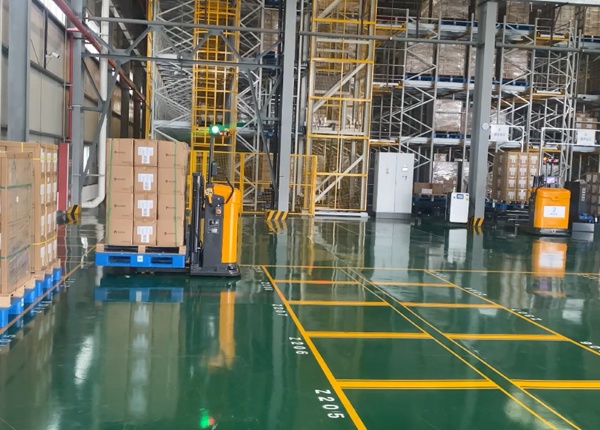
When an automated forklift moves a pallet, several events may need to be reflected in different systems. The warehouse management system manages inventory and warehouse work. Fleet control assigns transport tasks and coordinates vehicle movements. The vehicle controller executes movement and handling actions.
Problems arise when each system interprets task status differently. A WMS may consider a request issued, while the fleet controller has not accepted it. A vehicle may have picked up a pallet, but the inventory transaction may remain open. A communication retry may even create a duplicate task if the interface has no protection against repeated messages.
Before software development or commissioning, define the task interface as a transaction contract between the systems.
Start by deciding which system owns each piece of information. A clear division of responsibility reduces conflicting updates and makes troubleshooting easier.
WMS: typically manages inventory records, storage rules and warehouse task requests.
Fleet control: typically manages task dispatch, vehicle assignment and fleet-level execution status.
Vehicle controller: reports vehicle-level states and executes movement or load-handling commands.
External equipment controller: may coordinate conveyors, lifts, doors or other transfer equipment.
The exact architecture varies by project. Some functions may be combined in one system, but each critical data item should still have a defined owner.
For example, determine which system is authoritative for the task destination, whether the fleet controller may propose an alternative destination and who approves a change to the inventory location after a physical transfer.
A transport request should contain enough information for the receiving system to validate and execute the intended operation. The required fields depend on the warehouse process and vehicle configuration.
A typical task message may include:
| Field | Purpose |
|---|---|
| Task ID | Uniquely identifies the transport request |
| Load or pallet ID | Identifies the handling unit, when applicable |
| Pickup location | Defines the approved origin |
| Destination location | Defines the intended receiving point |
| Task type | Distinguishes putaway, retrieval or another operation |
| Priority or deadline | Supports dispatch decisions when required |
| Creation time and version | Supports ordering, tracing and controlled updates |
Do not assume that every field is mandatory for every task. Define required fields by task type, validate them before acceptance and return a clear error when a request is incomplete or invalid.
Both systems need an agreed interpretation of task progress. A message being received does not necessarily mean that a vehicle has been assigned or that the operation has started.
Depending on the implementation, task states may distinguish request received, validated, accepted, assigned, in progress, pickup completed, delivery completed, failed and canceled. Use only states that can be reliably reported by the actual system.
For each state, document which system generates the update, what event triggers it and whether it can be reversed. If the task is canceled after the vehicle has collected the pallet, the cancellation process must address the physical load rather than simply changing the database status.
Define acknowledgments separately from completion notifications. The sending system needs to know whether a message was received and whether the requested operation was accepted. It also needs a reliable indication of the final outcome.
Networks can fail, responses can be delayed and software may retry a request when it does not receive an acknowledgment. Without duplicate protection, the same warehouse instruction may be submitted more than once.
Use a stable task identifier and define how the receiving system handles repeated messages. A repeated request with the same identifier should not silently create a second physical movement. If a task must be changed, specify whether the interface uses an explicit update, cancellation or replacement process.
Also define how the systems handle a repeated completion message. Inventory should not be incremented, decremented or relocated twice merely because a notification was resent.
Test the interface with delayed acknowledgments, duplicate messages and restarts. The goal is to ensure that the systems can recover their shared understanding of the task without creating conflicting physical and digital states.
An error message should tell the receiving system what happened and what action is permitted. A generic failed status is difficult to use when different causes require different responses.
Consider defining distinct outcomes for:
Unknown pickup or destination location.
Invalid or unavailable inventory identifier.
Destination occupied or not ready.
Task rejected because required fields are missing.
Vehicle or transfer equipment unable to complete the operation.
Communication timeout with an uncertain physical outcome.
The last case deserves particular attention. A communication timeout does not prove that the vehicle failed to move the pallet. Before retrying the physical task, the systems may need to query the current task state or reconcile the actual load location.
Document which errors may be retried automatically, which require a new task and which require operator intervention. Include a clear record of the original request and the recovery action.
Interface acceptance should cover more than a successful transport. Test the message exchange, task-state transitions, inventory updates and recovery behavior.
For each test, retain the request, acknowledgment, status updates, timestamps, error details and final transaction result. Use a shared correlation identifier so that the WMS team and fleet-control team can trace the same task across their logs.
Include normal and abnormal scenarios: invalid locations, unavailable destinations, canceled requests, repeated messages, delayed responses, software restarts and a physical movement completed during a temporary communication interruption.
Where possible, test against a controlled environment before connecting to live inventory. Any unresolved difference between system status and physical reality should be treated as a project issue rather than ignored during acceptance.
Each system's data ownership and responsibilities are defined.
Task IDs and required message fields are specified.
Task states, acknowledgments and completion conditions are documented.
Duplicate requests and repeated notifications are handled safely.
Error codes have clear retry, cancellation or recovery rules.
Logs support end-to-end tracing of a task.
Acceptance tests include communication failures and uncertain outcomes.
Key checkpoint: The interface specification should explain what each message means, when a task changes state and how both systems recover when the physical operation and digital records no longer agree.
Provide the AGV forklift supplier with your existing WMS documentation, location conventions, task examples and transaction requirements. Identify the interfaces available from your current software vendor and any restrictions on data exchange.
Ask the project team to produce an interface specification and a test plan before development is completed. Confirm which side is responsible for each message, how errors are reported and what support is available when a task becomes inconsistent.
📖 AGV Forklift Guide — Essential manual for selection and safety.
⚙️ How AGV Systems Work — A deep dive into navigation and logic.
⚖️ AGV vs. AMR Comparison — Choosing the right technology for your facility.
💰 AGV Cost and ROI — Evaluating investment and payback periods.





 Chinese
 English